Case Study: Al Shohab Al Aliyah CRM Accounting System
“CRM & Accounting Integration | AlShohab AlAliyah” explains the project scope and what this practical case study demonstrates. This is a supporting case study, not the main product page. To commission a similar system, see Business and Administrative Systems Design and Development. This section presents “Case Study: Al Shohab Al Aliyah CRM Accounting System” through the project scope and delivery outcomes.
A complete administrative and accounting system for managing customers, suppliers, invoices, reporting and e-invoicing settings.
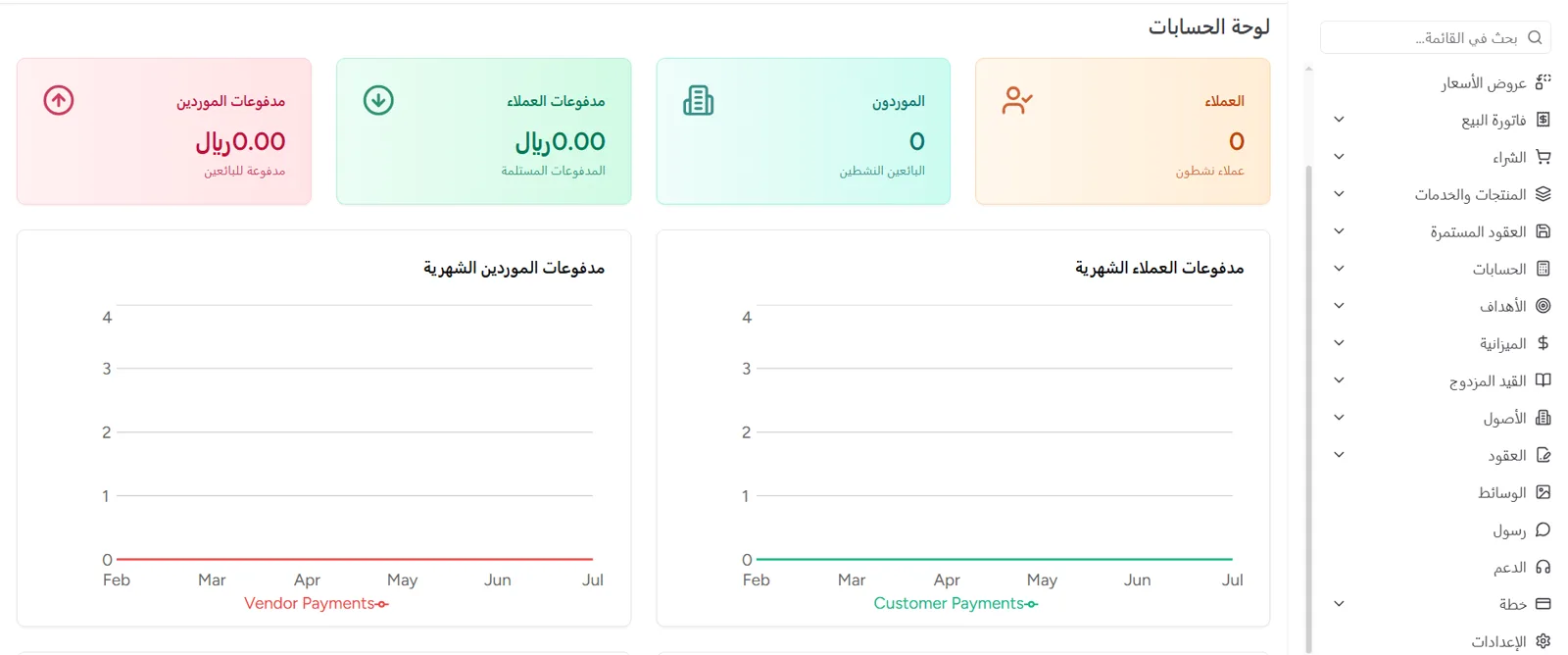
Project overview
The Al Shohab Al Aliyah CRM accounting system is a complete administrative and accounting system bringing together, in a single Arabic control panel, the management of accounts, customers, suppliers, products and services, invoices, recurring contracts and reporting, alongside operational settings such as payment settings, ZATCA e-invoicing, security settings and an AI assistant. Its aim is to organise the company's financial and administrative operations in one place rather than relying on scattered files and tools, with reporting that supports decision-making and a structure that can scale.
The challenge
Organising accounts, customers and suppliers in a single system.
Tracking customer and supplier payments and balances.
Managing invoices, purchasing and sales efficiently.
Connecting day-to-day operations to management reporting.
Preparing settings that support e-invoicing.
Reducing reliance on scattered files outside the system.
The solution Al Shohab Al Aliyah delivered
An accounts dashboard and management of customers and suppliers.
Sales invoices, purchases, products and services.
Recurring contracts and management reporting.
Payment settings and e-invoicing settings ZATCA.
Security settings such as reCAPTCHA from Google.
AI assistant settings within the system panel.
What was built
Accounts dashboard
An overview of customer and supplier payments and balances.
client management
A customer register with their transactions and balances.
Supplier management
A supplier register linked to purchases and payments.
Customer payments
Recording and tracking payments received from customers.
Supplier payments
Tracking payments to suppliers and vendors.
Sales invoices
Issuing sales invoices and linking them to customers and products.
procurement
Recording purchases and linking them to suppliers.
Products and services
Managing the products and services available for invoicing.
Recurring contracts
Managing recurring contracts and subscriptions with customers.
reports
Customer and vendor balance reports and a tax summary.
Setting up e-invoicing, the QR code and the seller's details.
Configuring payment methods and settings within the system.
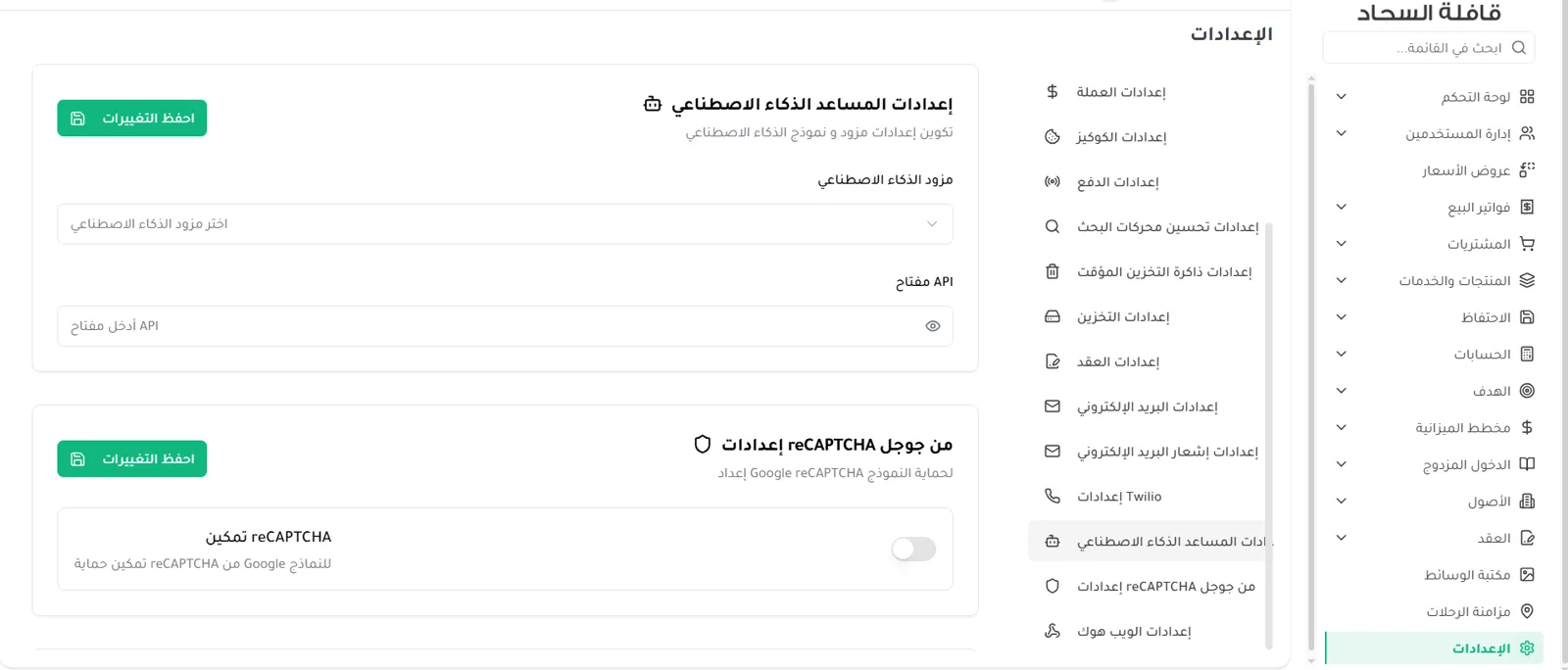
Protecting the forms with Google reCAPTCHA.
Configuring the AI provider and model within the panel.
The usage journey
The user signs in to the accounts dashboard and reviews the overall metrics.
They add and manage the customer and supplier records.
They define the products and services available for invoicing.
They issue sales invoices or record payments.
They track customer and vendor balances and the tax summary.
They configure the payment, e-invoicing and security settings.
Dashboard and reports
An accounts dashboard with cards for customers, suppliers and payments, monthly charts, and reports that can be filtered and downloaded as PDF.
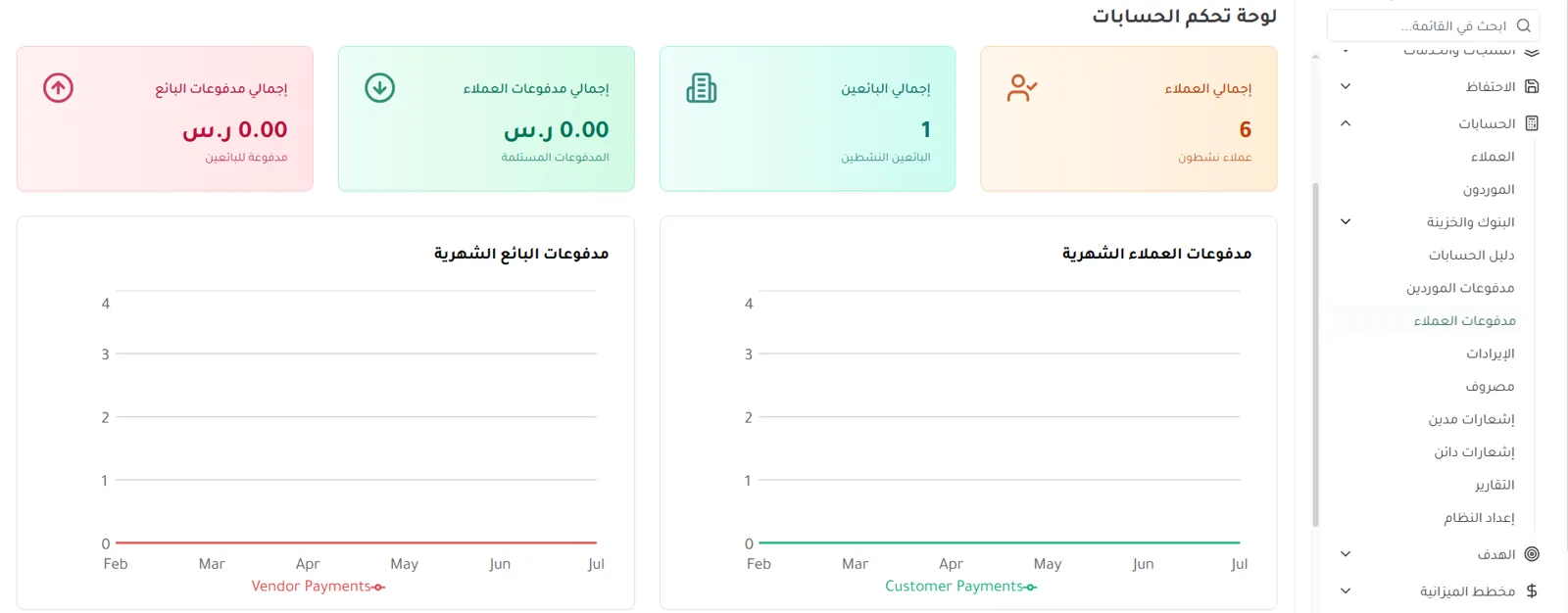

The screenshots are for illustration and contain sample data for demonstration only.
Additional details: E-invoicing settings ZATCA
The system includes an interface for configuring e-invoicing settings within its own panel as shown in the images, with no claim of official accreditation or of an actual connection to the Authority.
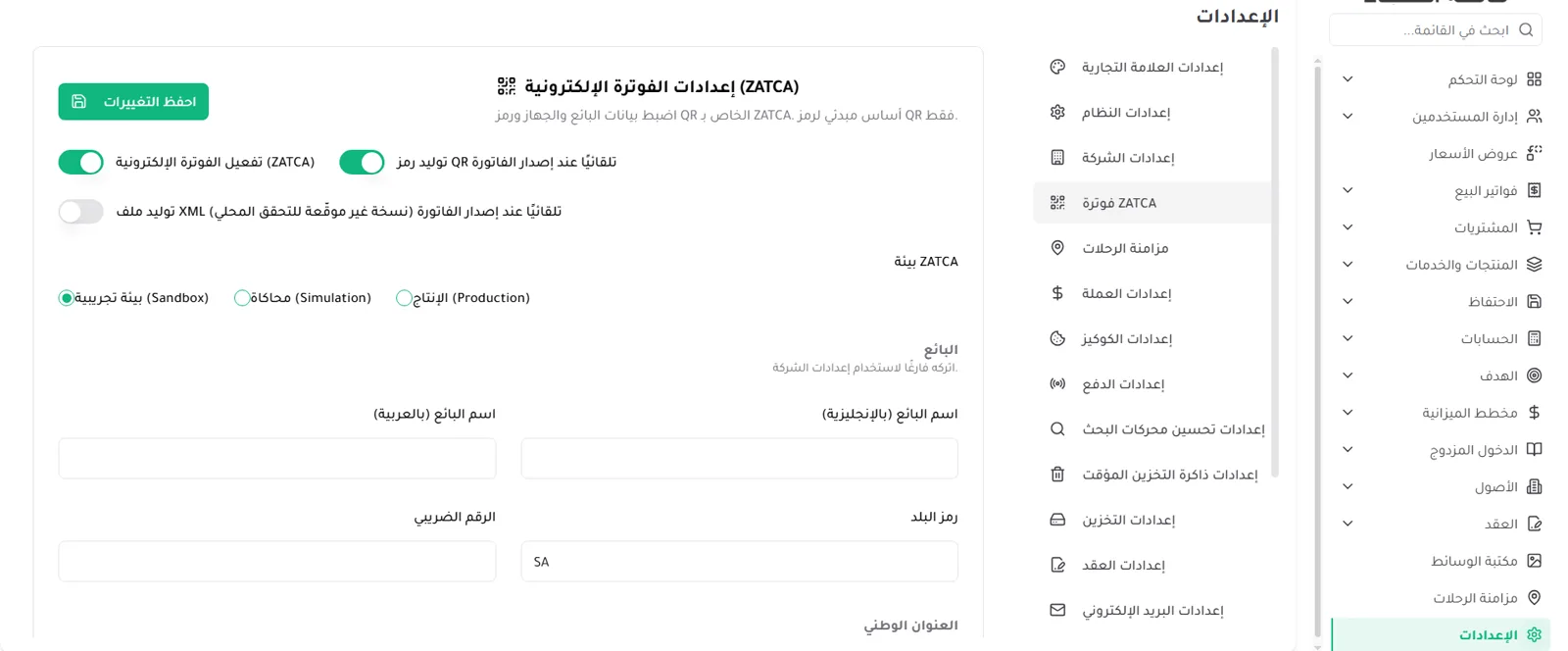
Enabling e-invoicing and generating a QR when the invoice is issued, as shown in the system panel.
Choosing the environment: sandbox (Sandbox) or simulation (Simulation) or production (Production).
Seller data fields: the name in Arabic and English, the tax number, the country code, and the national address.
The careful wording: the system supports configuring e-invoicing settings and the requirements of ZATCA within the system's own panel. The screenshot shown is from a sandbox environment and does not represent official accreditation.
Business value
Unifying accounts and customer data in a single system.
Reducing operational fragmentation and reliance on scattered files.
Improving the tracking of invoices, payments and balances.
Supporting decisions through downloadable management reports.
Supporting local requirements through settings suited to the Saudi market.
Preparing the system to grow through new modules and integrations.
Image gallery
Screenshots of the system's screens. The data shown is sample data for demonstration only.
Project links
View the system directly, or contact Al Shohab Al Aliyah to build a similar accounting and CRM system for your business.

Ready for your next project?
WithAl Shohab Al Aliyah
Tell us about your idea and we'll build you a complete digital system — programming, automation and AI, and digital marketing.
Frequently asked questions about the Al Shohab Al Aliyah CRM accounting system
Clear answers about this system and how we can help you build a similar accounting and CRM system. Find out about our methodology in Case Studies or take a look at Al Shohab Al Aliyah Services.
The Al Shohab Al Aliyah CRM accounting system is a complete administrative and accounting system bringing the management of accounts, customers, suppliers, invoices, products, contracts, reporting and operational settings together in a single Arabic control panel.
Alongside accounts and invoices, the system adds customer and supplier relationship management, purchasing and sales, recurring contracts, reporting, and operational settings such as payment, e-invoicing and security — rather than relying on scattered files and tools.
The system provides customer and supplier records with tracking of customer and supplier payments and balances, linked to invoices, purchases, sales and reporting from one place.
Yes. The system's panel includes an interface for configuring ZATCA e-invoicing settings covering enabling invoicing, generating the QR code, choosing the environment (sandbox / simulation / production), and the seller data fields as shown in the panel. The settings shown are in a sandbox environment and do not represent official accreditation.
The reports let you track customer balances, vendor balances, the tax summary and invoice ageing, with date filtering and the option to download the report as a PDF to support management decisions.
Yes. The products, services, contracts, accounts, reports and operational settings can all be customised to suit the company's business and its size, on a structure that can scale.
The system's panel includes payment settings and other operational settings such as reCAPTCHA for security and AI assistant settings, and Al Shohab Al Aliyah can build whatever integrations each company requires.
Contact Al Shohab Al Aliyah through the contact page or on WhatsApp, and we start with a session to understand your requirement and set a clear plan for building an accounting and CRM system that suits your business.
Acceptance tests for the accounting and CRM system
A list of features is not enough to accept a financial and administrative system. Every route has to become a test with a known input, a defined permission, and an expected result that can be reviewed — without using real operating data in the test environment.
| Route | What is tested | Acceptance threshold |
|---|---|---|
| Customer and invoice | Creating the customer, the line items, saving, and the status | The values, the record and the permission match the agreed scenario |
| Supplier and purchasing | The link between the supplier, the purchases and the payments | The record is not visible to a user outside their permissions |
| Report | The period, the filters and the source of the figures | Every value can be traced back to the sample records |
| E-invoicing | The seller fields, the environment and the QR code | Settings are tested only; accreditation and compliance require separate official verification |
Review the requirements of the accounting system andE-Invoicing each separately, and document any external provider in the integration scope. The acceptance points are recorded in the handover record before moving into live operation.